If you have ever created an image with Google's Gemini AI, you have probably noticed a small icon stamped in the bottom-right corner. That tiny sparkle symbol — along with the text "Generated by AI" — is what most people refer to as the Gemini watermark. It was introduced by Google as a transparency measure, but it has since become one of the most common questions among creators who use AI image generation tools on a daily basis.
This guide breaks down exactly what the watermark is, why Google decided to include it, how it works under the hood, and what options are available if you want to remove it from your images.
The Visible Watermark: What You Actually See
The Gemini watermark is a small, semi-transparent overlay placed on images produced through Google's Gemini model. On most images, it appears as a four-pointed sparkle icon paired with the phrase "Generated by AI" or "Made with Google AI." The position is generally consistent — bottom-right — though it can shift slightly depending on the image dimensions and the specific Gemini interface you used.
The watermark sits on a lightly shaded rectangle, making it readable against both light and dark backgrounds. It is not burned deep into the pixel data the way some stock-photo watermarks are. Instead, Google renders it as an overlay after the image generation step is complete, which means the underlying image data beneath the watermark area is not destroyed — it is simply covered up.
That distinction matters. Watermarks that destroy underlying data (like aggressive tiling patterns across the entire image) are far harder to clean up. The Gemini approach is lighter by design, because Google's primary intent is disclosure rather than piracy prevention.
Why Does Google Add a Watermark?
The short answer is accountability. As AI-generated imagery has become more photorealistic, regulators, journalists, and the general public have grown concerned about deepfakes, misinformation, and the difficulty of telling real photographs apart from synthetic ones. Google's response — like that of several other major AI companies — has been to clearly label generated content at the point of creation.
There are a few motivations behind this:
- Regulatory compliance. The EU AI Act, which began enforcement in stages through 2025 and 2026, includes provisions requiring AI-generated content to be identifiable. Google operates globally, and building labeling into the product itself is simpler than trying to handle compliance on a region-by-region basis.
- Public trust. Google has positioned Gemini as a mainstream creative tool. Making the output clearly labeled reduces the risk that generated images are mistaken for real photographs in news articles, social media, or court evidence.
- Industry norms. Google is a founding member of the Coalition for Content Provenance and Authenticity (C2PA), which is developing technical standards for content authentication. The watermark aligns with that broader push.
None of these motivations prevent individual users from removing the watermark for personal use. Google's terms of service for Gemini allow users to use generated images broadly, and the visible watermark is primarily a social norm rather than a strict legal lock.
SynthID: The Invisible Layer You Cannot See
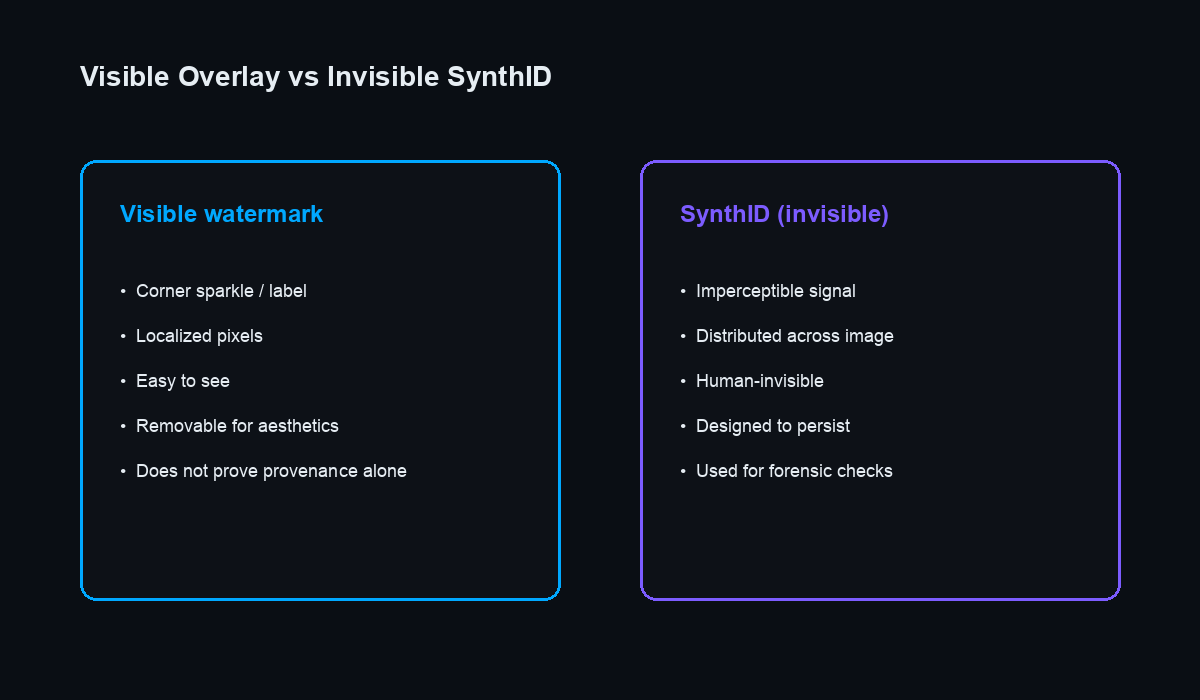
The visible sparkle icon is only half the story. Alongside the overlay, Google also embeds an invisible watermark using a technology called SynthID, developed by Google DeepMind.
SynthID works by making imperceptible changes to the pixel values of an image — adjustments so subtle that no human eye can detect them, but that a trained detection model can identify with high accuracy. Think of it like a fingerprint woven into the texture of the image itself. Cropping the image, applying filters, or even screenshotting it does not reliably strip the SynthID signal.
This is fundamentally different from the visible watermark. The overlay can be removed by covering, cropping, or processing the corner of the image. SynthID, on the other hand, is distributed across the entire image and is designed to survive common transformations.
For most users, the practical concern is the visible watermark — the one that looks unprofessional in a presentation, distracts from artwork you want to share on social media, or simply gets in the way. SynthID runs silently in the background and has no visual impact on your image at all.
Visible Watermark vs. Invisible Watermark: Key Differences
- Visibility. The overlay is immediately obvious. SynthID is completely invisible to the human eye.
- Removal difficulty. The overlay can be removed with image processing tools. SynthID is significantly harder to strip and requires adversarial techniques that often degrade image quality.
- Purpose. The visible watermark is meant for casual observers — anyone who sees the image should know it was AI-generated. SynthID is designed for forensic verification by platforms and fact-checkers using Google's detection tools.
- Persistence. Screenshots, compression, and format conversion can sometimes weaken SynthID, but it is far more resilient than a corner overlay. The visible watermark disappears entirely if the image corner is cropped.
Where Does the Watermark Appear?
The Gemini watermark shows up on images generated through several Google surfaces:
- Gemini web app (gemini.google.com) — the main interface most people use for text-to-image prompts.
- Gemini in Google Messages — available on Android, where users can generate images directly in a chat conversation.
- Gemini API — developers building applications on top of Google's image generation models will also see watermarked output by default.
- Google Slides and Workspace integrations — as Google rolls Gemini into its productivity suite, generated illustrations carry the same labeling.
The watermark format is consistent across these surfaces, though the exact rendering can vary slightly between product versions.
Can You Remove It?
Yes. Because the visible watermark is a localized overlay in one corner of the image, it can be removed without affecting the rest of the image. The key is using a tool that targets only the watermark area and preserves the original resolution and color data everywhere else.
Our Gemini Watermark Remover does exactly this. It runs entirely in your browser — no server uploads, no cloud processing — and identifies the specific pixel region where the watermark sits. The result is a clean image at original quality, processed in under a second.
Worth noting: removing the visible watermark does not remove the SynthID invisible watermark. If someone runs the image through Google's SynthID detector, it will still be flagged as AI-generated. For most personal and creative uses, this is not a concern — SynthID is primarily used by platforms and researchers, not casual viewers.
Should You Remove It?
That depends entirely on your context. For personal creative projects, portfolio mockups, social media content, or design drafts, removing the watermark is perfectly reasonable. Nobody wants a distracting label on their artwork.
If you are publishing content in a journalistic or educational context where the audience expects to know whether an image is real or generated, keeping some form of disclosure is a good practice — even if that means adding your own caption rather than relying on Google's overlay.
The guiding principle is straightforward: be transparent about AI-generated content when it matters, and feel free to clean up your images when it does not.