Watermark removal can feel like magic. You click once, a distracting badge vanishes, and the texture that should have been there appears in its place. Behind the curtain, though, it is not magic — it is math. Specifically, it is a two-stage combination of reverse alpha blending to recover buried data and spatial inpainting to reconstruct whatever is left.
Here is an accessible look at how our Gemini Watermark Remover does that work directly in your browser, on images you generated yourself.
1. The Alpha-Blending Problem
When a generator stamps a watermark, it usually does not simply overwrite the pixels underneath. Instead it blends the badge over the artwork using a transparency value called alpha. Each output pixel becomes a weighted mixture of the mark and the original:
Result = (Watermark × Alpha) + (Original × (1 − Alpha))
Because a typical Gemini-style mark is semi-transparent, alpha sits well below 1 across most of the badge. That is the key insight: the original information is not gone, it is merely buried under the mark's contribution. If we can model the mark, we can work backward toward the original.
2. Reverse Alpha Blending
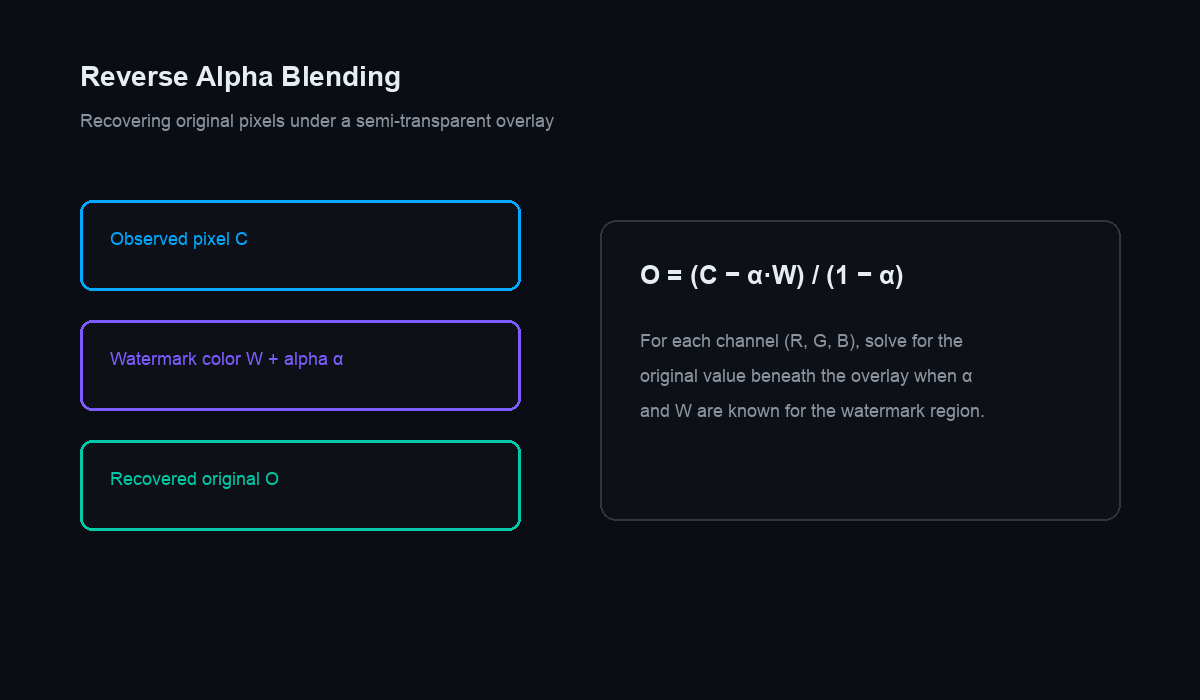
The first stage runs that equation in reverse. Because the standard mark has a known shape, position, color, and alpha profile, the tool can estimate the watermark's contribution at every affected pixel and subtract it out, rearranging the formula to solve for the original:
Original ≈ (Result − Watermark × Alpha) / (1 − Alpha)
Wherever alpha is only partial, this recovers a large share of the true underlying pixel — the actual data, not a guess. That is what separates a principled remover from a generic healing brush, which ignores the mark entirely and just samples nearby colors.
3. Where Subtraction Breaks Down
Reverse blending has a hard limit. In the brightest, most opaque parts of a badge — the solid white core of a sparkle, for instance — alpha approaches 1. Look at the formula and the problem is obvious: as alpha nears 1, the (1 − Alpha) term nears zero, the original's contribution collapses, and dividing by a near-zero number amplifies noise instead of detail. In those spots the underlying information really was overwritten and cannot be subtracted back. Something else has to fill the gap.
4. Spatial Inpainting
That something is spatial inpainting. For the small opaque region left over, the algorithm studies the clean pixels immediately around it and asks what belongs there. It reads three things at once: the texture (is this skin, grass, fabric, sky?), the lighting gradient across the area, and the larger structure such as edges or lines that ought to continue through the patch.
It then synthesizes new pixels that are consistent with all three, extending edges so they do not stop at the seam and matching the local grain so the repair does not read as a smooth, plastic smear. A final feathering pass blends the reconstructed core into the reverse-blended surroundings so there is no visible border between the two stages.
This is also why results depend so much on what sits under the mark. A badge over flat sky or smooth skin is almost trivial to rebuild, while one crossing fine text, a face, or a busy repeating pattern is far more demanding — there is simply more structure that has to line up perfectly on both sides of the seam. Understanding that helps set fair expectations for any tool, ours included.
5. An Honest Word About "Recovery"
It is worth being precise about language. Where the mark was partly transparent, the tool genuinely recovers original data through subtraction. Where the mark was fully opaque, no tool can retrieve information that no longer exists; the best it can do is produce a plausible, seamless reconstruction from context. High quality here means the result is convincing and consistent — not that destroyed pixels were literally resurrected. Knowing the difference is what keeps expectations realistic and results trustworthy.
6. Why Local Processing Helps the Math
Running these calculations on a remote server introduces a subtle enemy: recompression. Uploading a JPEG to a service typically re-encodes it, and lossy compression nudges pixel values away from their true numbers. Feed those muddied values into reverse alpha blending and the subtraction is less accurate, which shows up as faint halos or blotches around the cleaned area.
Processing locally avoids that entirely. Our JavaScript engine works on the raw pixel array exactly as it sits in your browser's memory, at full precision, with no upload round-trip and no server-side re-encode. More accurate input means a more accurate reverse blend, which means fewer artifacts and a cleaner hand-off to the inpainting stage. As a bonus, nothing you generate ever leaves your device.
There is a speed dividend, too. With no file to upload and no server queue to wait in, the whole operation finishes in roughly the time a remote tool would still be transferring your image — and because everything runs on your own hardware, it keeps working even with a flaky connection or none at all.
7. The Visible Mark vs. Invisible Provenance
Everything above concerns the visible badge — the pixels you can see. It is entirely separate from invisible provenance systems like SynthID, which encode an origin signal into the image's statistics rather than into a corner logo. Reverse blending and inpainting operate on the visible overlay of your own image; they simply are not the same layer as those underlying provenance marks, which exist to keep AI origin verifiable.
Summary
Rather than crudely painting over your picture, the tool performs a surgical, two-stage extraction:
- Locate the known coordinates and profile of the mark.
- Reverse the alpha blend to recover the buried original data.
- Inpaint only the fully opaque remnants using surrounding texture, gradient, and structure.
- Feather the two stages together for a seamless finish.
It is a high-speed mathematical operation that runs in milliseconds, giving you a clean version of your own AI image without launching heavy desktop software — and without your files ever leaving your browser.