
For most of the web's history, "editing an image" meant uploading it to a server, processing it in a backend, and downloading the result. That is convenient for developers but poor for privacy — your file has to leave your device. Modern browsers changed the trade-off. A tool like the Gemini Watermark Remover can now run its whole pipeline on your machine, so the images you are cleaning (your own AI generations) never touch a network.
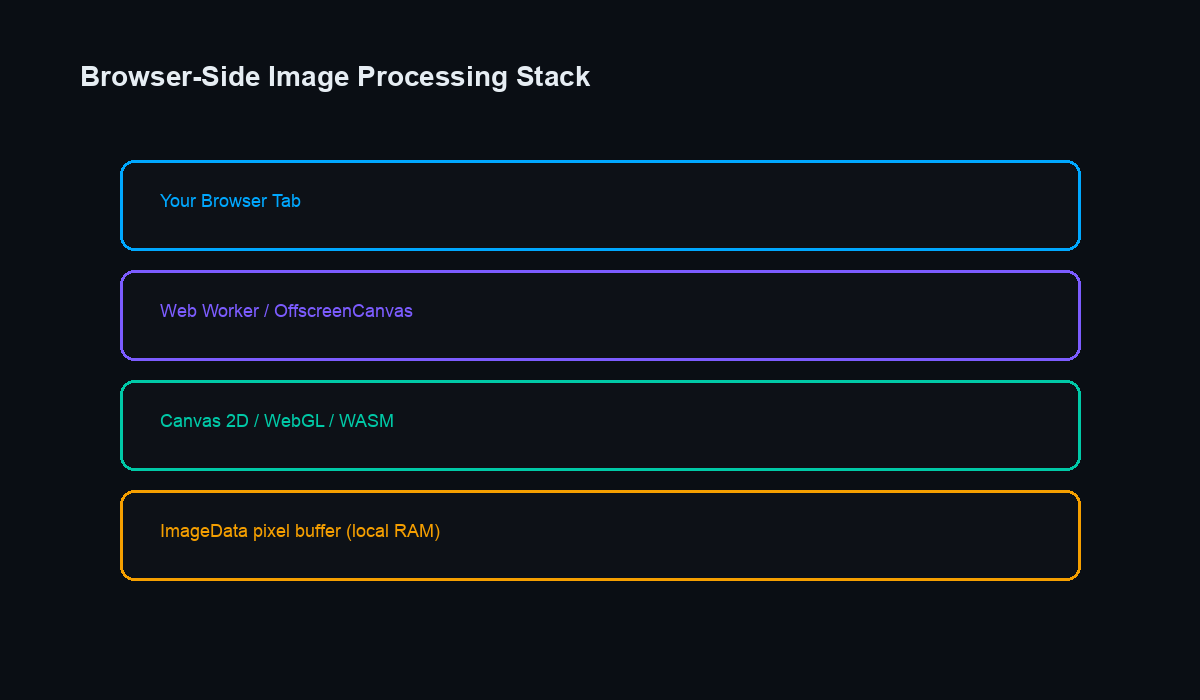
This is a developer-oriented tour of the browser technologies that make local, high-resolution image processing practical, along with the trade-offs you meet along the way. If you have ever wondered how a static site can edit a multi-megapixel photo without a server, this is the stack.
The Canvas API: Direct Pixel Access
Everything begins with the <canvas> element and its 2D context. When you draw an image into a canvas, getImageData() returns an ImageData object whose data property is a Uint8ClampedArray — a flat byte array in R, G, B, A order, four values per pixel. A single 1024×1024 frame is therefore about 4.2 million bytes.
Editing is ordinary array arithmetic. To reach the pixel at (x, y) you compute the index (y * width + x) * 4, adjust the four channels, then write the buffer back with putImageData(). There is no hidden magic: removing a visible overlay from your own image is ultimately a well-chosen loop over that array. Note that this operates on the visible pixels only; invisible provenance signals such as SynthID are a separate concern and are not what a canvas edit is targeting.
Keeping the UI Alive with Web Workers
Looping over four million bytes on the main thread will freeze the page — scrolling stutters, buttons stop responding, and the browser may show a "page unresponsive" warning. The fix is the Web Worker, a background thread with no DOM access whose only job is computation.
The typical pattern is to send the pixel buffer to a worker, let it run the heavy math, and post the finished result back. Because a worker cannot touch the DOM, it cannot accidentally trigger a re-render, which keeps your animations and progress indicators smooth. For batch jobs you can spawn one worker per CPU core — read navigator.hardwareConcurrency to size the pool — and process several images at once.
OffscreenCanvas for Heavy Rendering
A worker cannot use a normal on-screen canvas, but it can use an OffscreenCanvas. This lets a background thread decode, resize, and composite images entirely off the main thread. For large assets it is the difference between a responsive tool and a stuttering one, because both the pixel math and the rendering happen away from the UI. Support is now broad across current versions of Chrome, Edge, and Firefox, with Safari having caught up more recently.
Zero-Copy Transfers
Moving data between threads normally means copying it, and copying multi-megabyte buffers repeatedly is wasteful. The browser avoids this with Transferable Objects. When you pass an ArrayBuffer as a transferable, ownership moves to the receiving thread instead of the data being duplicated — a near-instant operation regardless of buffer size.
The catch worth remembering: once transferred, the buffer is detached on the sending side and can no longer be read there. In practice you transfer the pixels to the worker, and the worker transfers the finished buffer back. This handoff is what keeps batch processing fast even with dozens of files queued.
GPU Acceleration: WebGL and WebGPU
Some operations are naturally parallel: every output pixel depends only on a small neighborhood of input pixels. That maps perfectly onto a GPU. With WebGL you upload the image as a texture and run a fragment shader, written in GLSL, that executes across many pixels simultaneously. The newer WebGPU API exposes compute shaders more directly and is the modern path where it is available.
GPU work is dramatically faster for pixel-parallel filters, but it is not free. Uploading a texture and reading the result back both cost time, so for very small images a plain CPU loop can actually win. The practical rule is to reserve the GPU for large images or effects heavy enough to hide that transfer overhead — and to benchmark rather than assume.
WebAssembly for Serious Number-Crunching
When an algorithm is too sequential for the GPU but too slow in plain JavaScript, WebAssembly (Wasm) fills the gap. Compiled from C, C++, or Rust, it runs at near-native speed and is ideal for porting an existing image library into the browser. A common architecture runs a Wasm module inside a Web Worker, combining native-speed math with a thread that never blocks the interface.
Managing Memory at High Resolution
Resolution is the real constraint. A 4K (3840×2160) frame is roughly 33 MB of raw RGBA data, and intermediate copies multiply that number quickly. A few habits keep memory under control:
- Reuse a single buffer across steps instead of allocating a fresh array for each one.
- Drop references to large
ImageDataobjects and canvases as soon as you are done so they can be garbage-collected. - Process very large batches sequentially rather than holding every decoded image in memory at once.
- Prefer transfers over copies whenever a buffer crosses a thread boundary.
Why Local Processing Is Worth the Effort
Wiring these APIs together is more work than posting a file to a server, but the payoff is real: your images never leave your device, there is nothing to upload or wait for, and the tool keeps working offline. For anyone tidying up their own AI-generated art, that privacy-by-default design — explored further in our piece on browser-based image tools and privacy — is the entire point. The browser has quietly become a capable image workstation, and these are the building blocks that make it one.